Accessibility Training
Begin your digital accessibility training today
Two brand new courses in the UC Learning Center!
What Is Digital Accessibility?
An introductory course explaining what digital accessibility is, why it matters, how digital barriers affect people with disabilities, and UC San Diego’s commitment to inclusive digital experiences. Designed for leadership, faculty, and staff who create or manage digital content.
Digital Accessibility Basics
A foundational course covering WCAG, the POUR principles, and common accessibility barriers, with practical guidance for creating accessible websites, applications, and documents at UC San Diego. Completing the 'What Is Digital Accessibility?' course first is strongly encouraged.
Role-Based Training
UC San Diego has contracted with SiteImprove to provide accessibility trainings that are tailored to specific audiences. Below are links to SiteImprove on-demand training videos developed for each roles.
Note: You need to be logged in to siteimprove.ucop.edu before following any of the below links.
- Log in to https://siteimprove.ucop.edu/.
- When prompted, select University of California-San Diego from the drop-down menu.
- Continue to log in with your AD credentials.
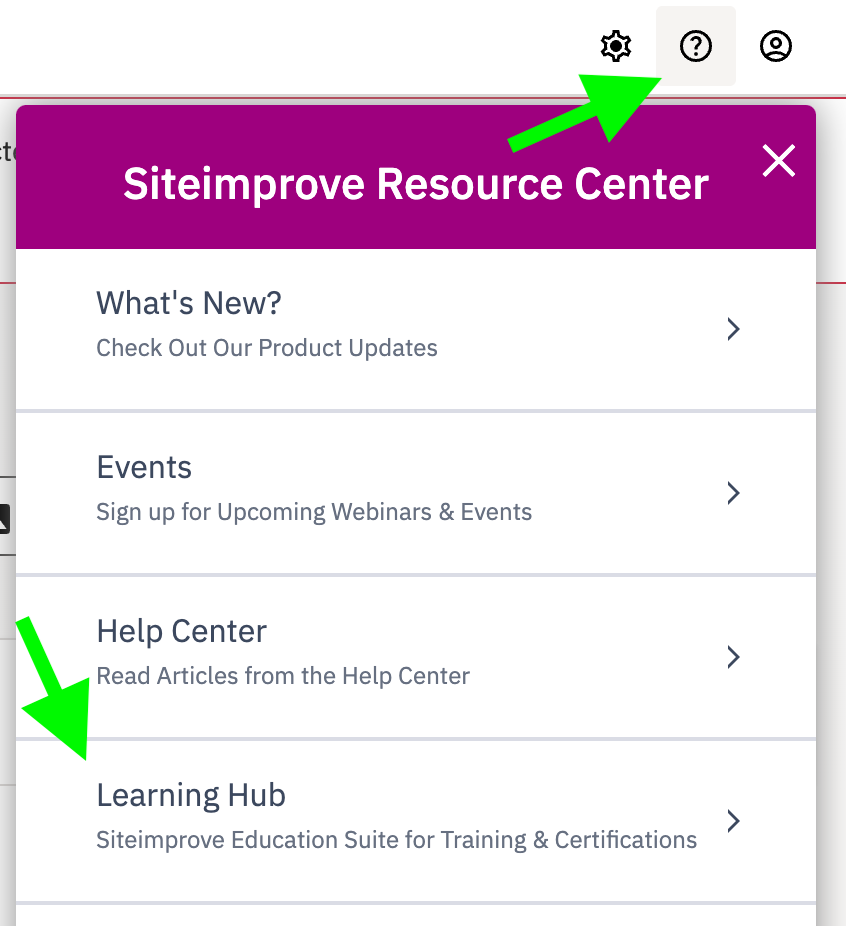
- From the top-right corner of the Siteimprove navigation bar, select "Open Resource Center" (the circled '?') and then "Learning Hub" from the drop-down menu.
- If it's your first time logging in, you may be taken to a login screen where you will need to enter your AD credentials again. If you're a return user, you should be taken directly to the Learning Hub. for assistance
- If you have trouble logging in, please email LearningHub@siteimprove.com for assistance.
Educators
Build a foundation for inclusive teaching in digital environments. Learn how accessibility impacts student learning, and how to structure content, materials, and online experiences so all students can access, engage with, and succeed in your course.

Content Contributors
Ensure that any content you post on UC websites is accessible by using proper headings, adding alternative text for images, providing captions for videos, and ensuring that documents, like PDFs, are readable by assistive technology.

Marketers
Make your content reach more people and perform better. Learn how accessibility impacts engagement, SEO, and campaign effectiveness, and how small content choices (like links, images, and structure) can make a big difference.

Web Developers
Learn how accessibility is built into the code. This course introduces the foundations of semantic HTML, ARIA, keyboard navigation, and testing, helping you create web experiences that are robust, standards-compliant, and usable for all.

Leadership
As a leader at UC San Diego, it's crucial to champion web accessibility by ensuring teams follow established guidelines and policies. Supporting accessibility initiatives promotes inclusivity, legal compliance, and enhances the user experience for all stakeholders. By encouraging a culture of accessibility, you help ensure that everyone—regardless of ability—can access and engage with UC San Diego’s digital content, reflecting our commitment to diversity and inclusion.
